 Roadmap · October 2026
App Factory:
where we are going.
Business software from a plain description
App Factory turns a description in plain language into a complete business application that you can understand and maintain. This brochure shows what it does today, and the seven steps we are taking next: live data from the systems you already have, easier automation, dashboards, maps, compliance and new kinds of output.
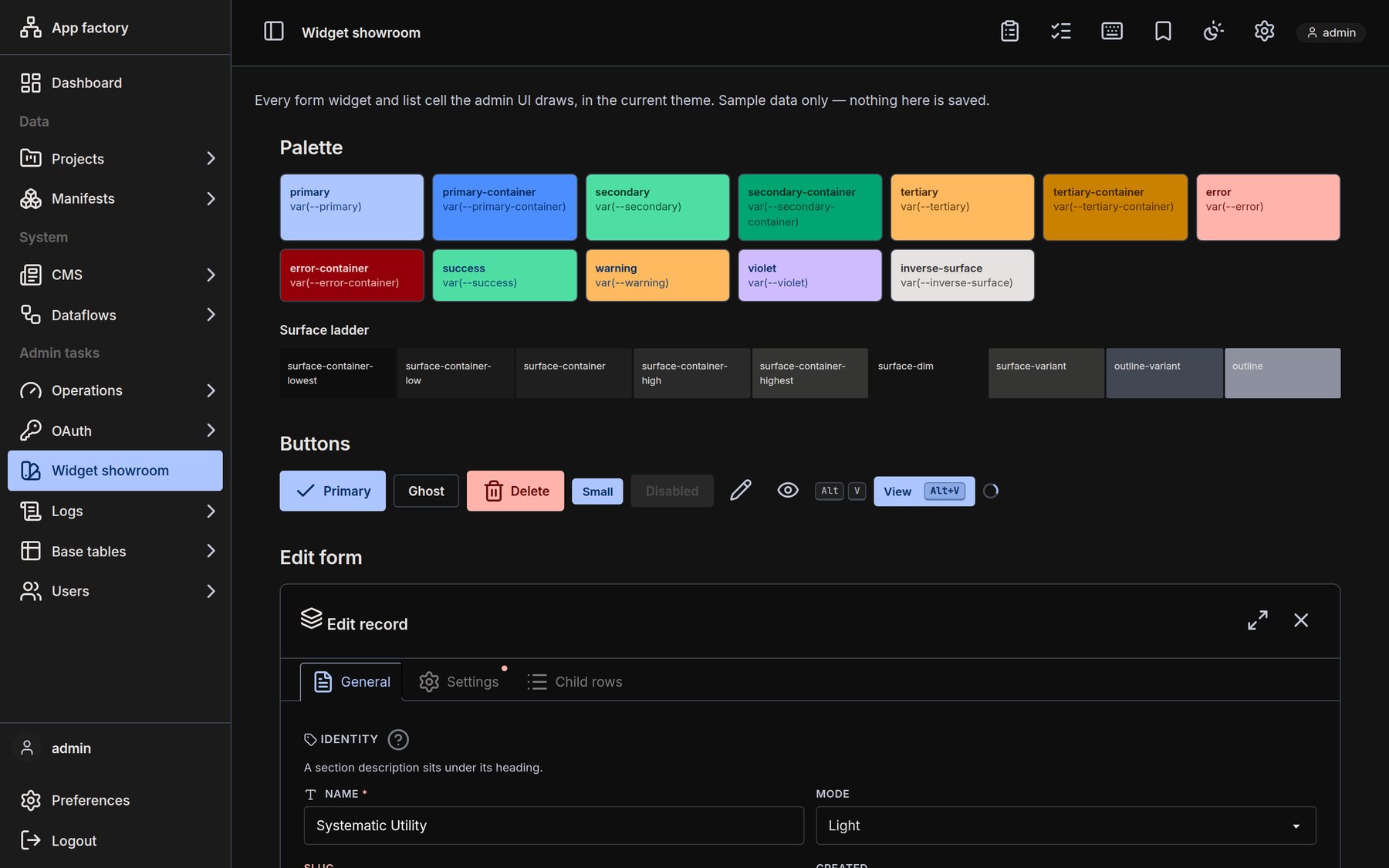
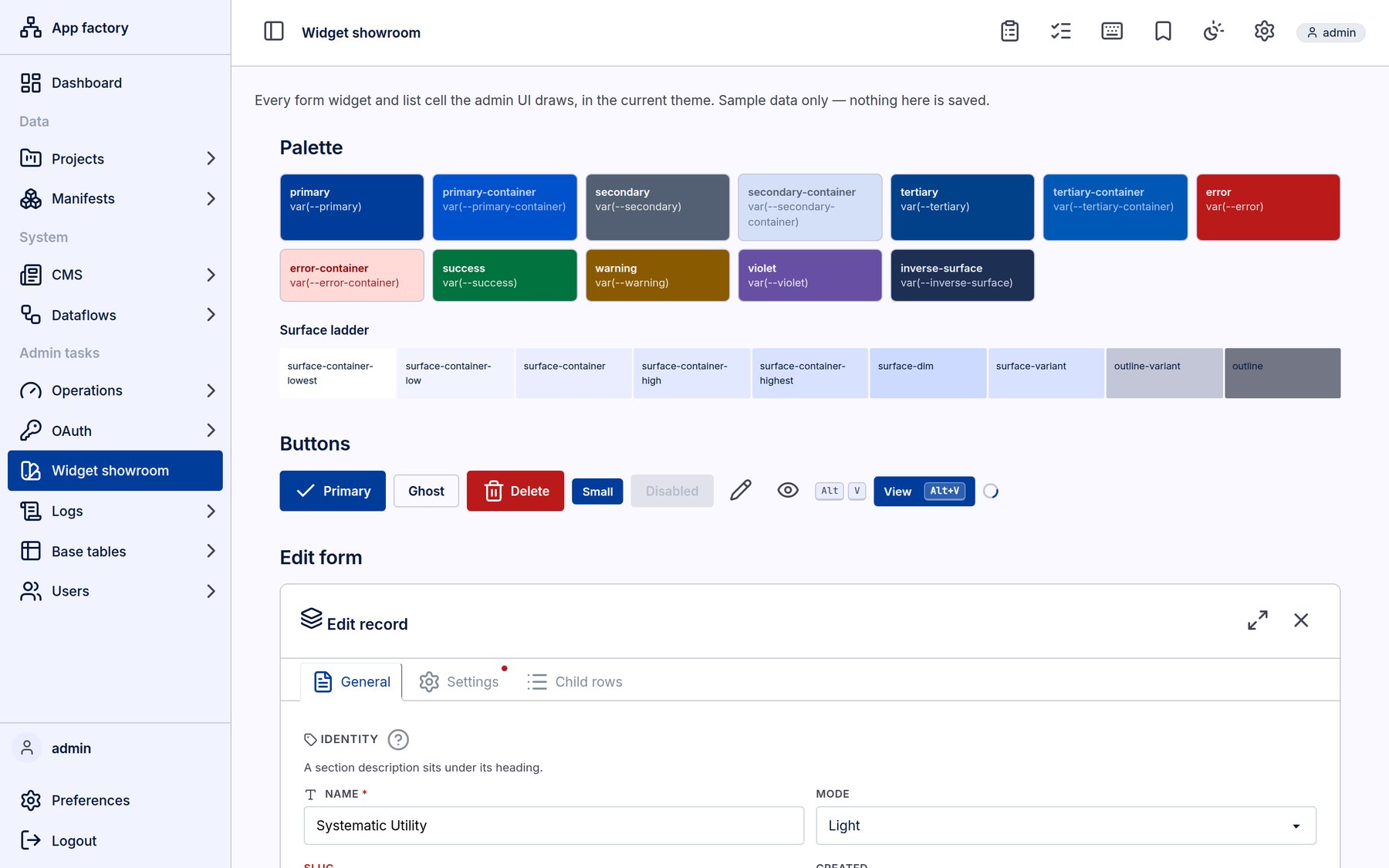 Light
Dark
Light
Dark
App Factory today
From a description to a running application
You describe the system you need in plain language. AI agents turn the description into manifests: precise, readable definitions of every table, field, relation and access rule. Our own code generators then build the application from them. The result is predictable code with a known structure, not a black box.
Write what the system must do. Attach documents and the web forms it must receive.
The AI asks only about what is genuinely unclear.
AI agents write the manifests. A validator checks every file and sends errors back.
You read and adjust the manifests, your specification.
Our generators build and install a standalone application.
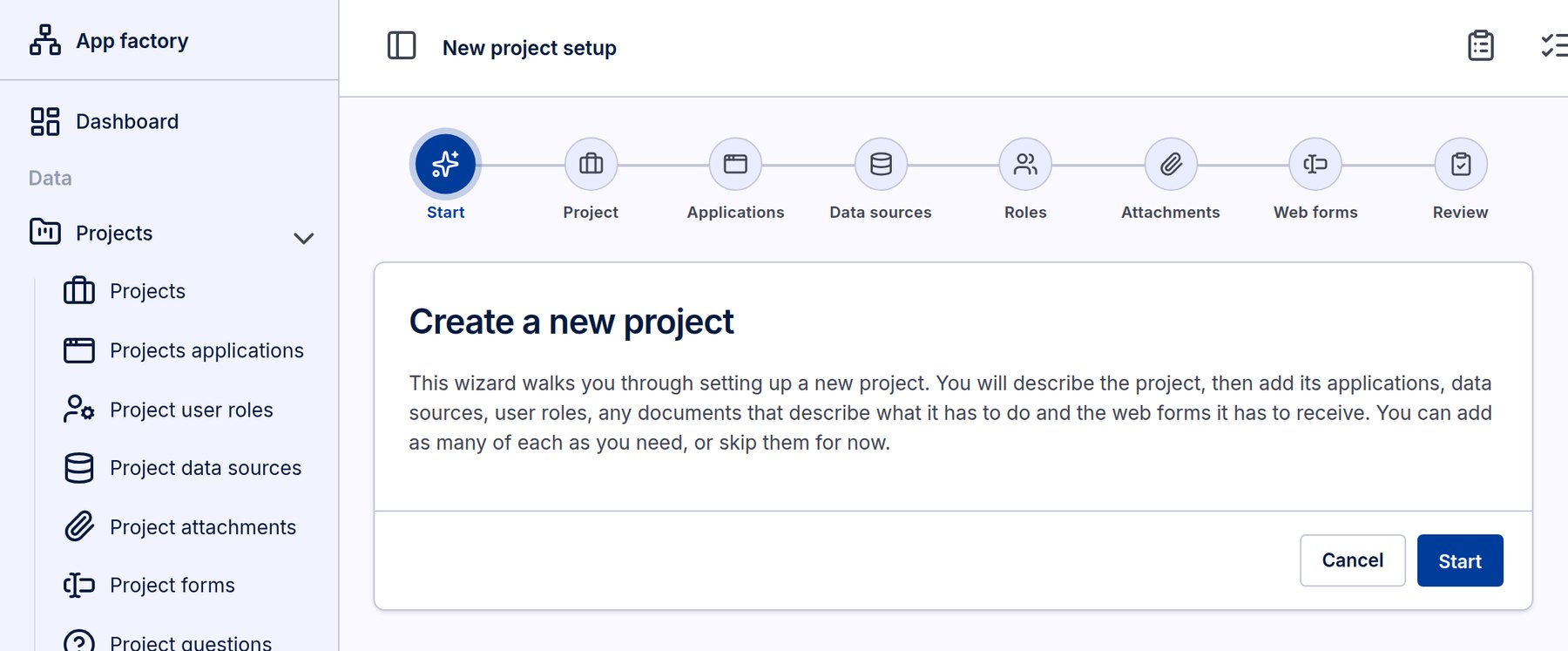
The new-project wizard: project, applications, data sources, roles, attachments and web forms, then review.
to generate the full data model of a business system with about 80 tables.
Every table of a generated app has a REST API and an MCP server, so other systems and AI assistants can use it.
PostgreSQL, Python FastAPI and HTML with HTMX on Ubuntu Linux. The same for every project, so everything can be automated.
What every generated application already gets
App Factory roadmap2 / 8A clear division of work
Built by AI. Run by your administrator.
App Factory keeps two kinds of definitions apart. The structure of your application is written by AI and built by our generators. Everything you want to change from week to week is a live definition that your own administrator maintains in the running application, with no programmer and no new release.
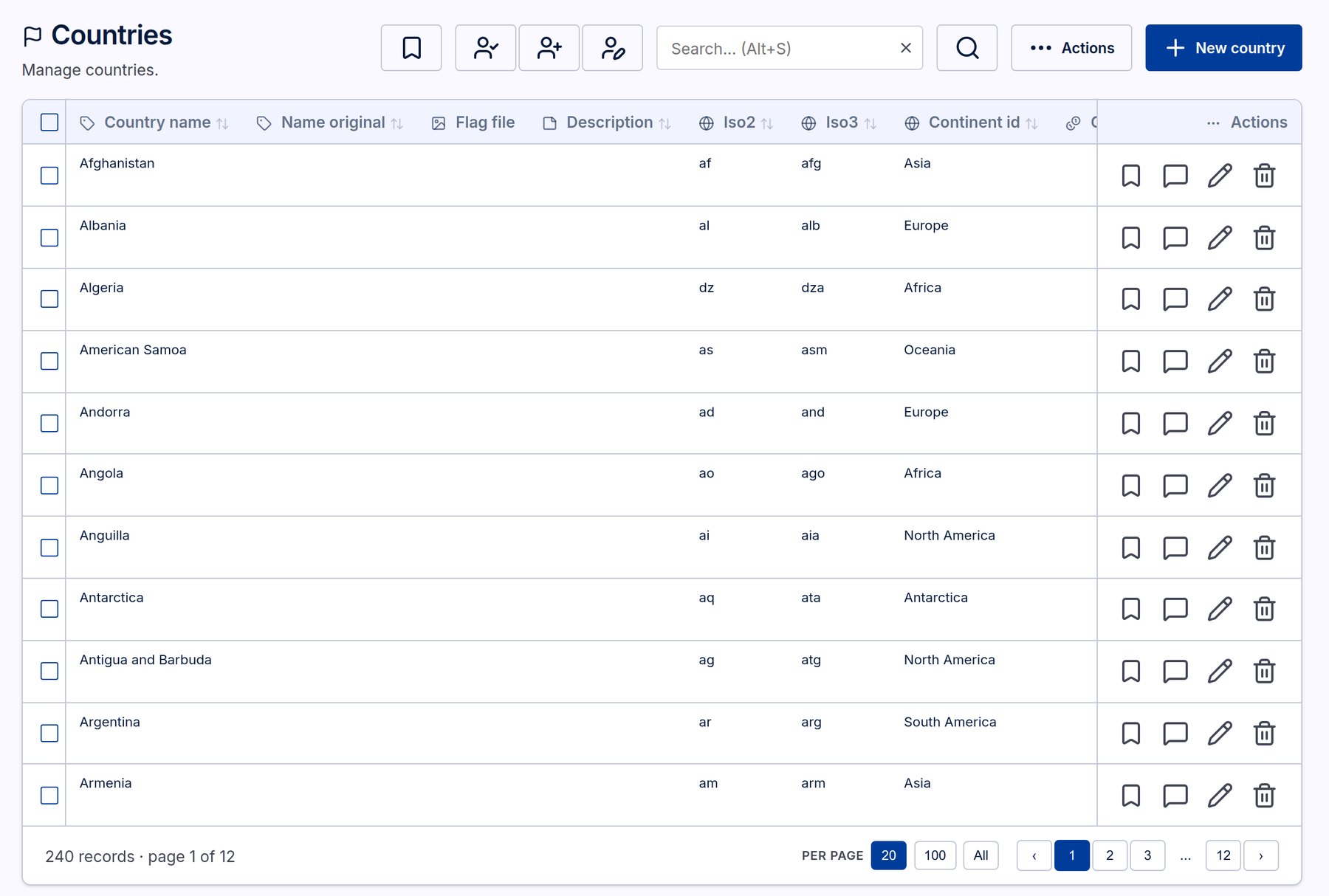
A generated list: search, bookmarks, comments, bulk actions and paging come with every table.
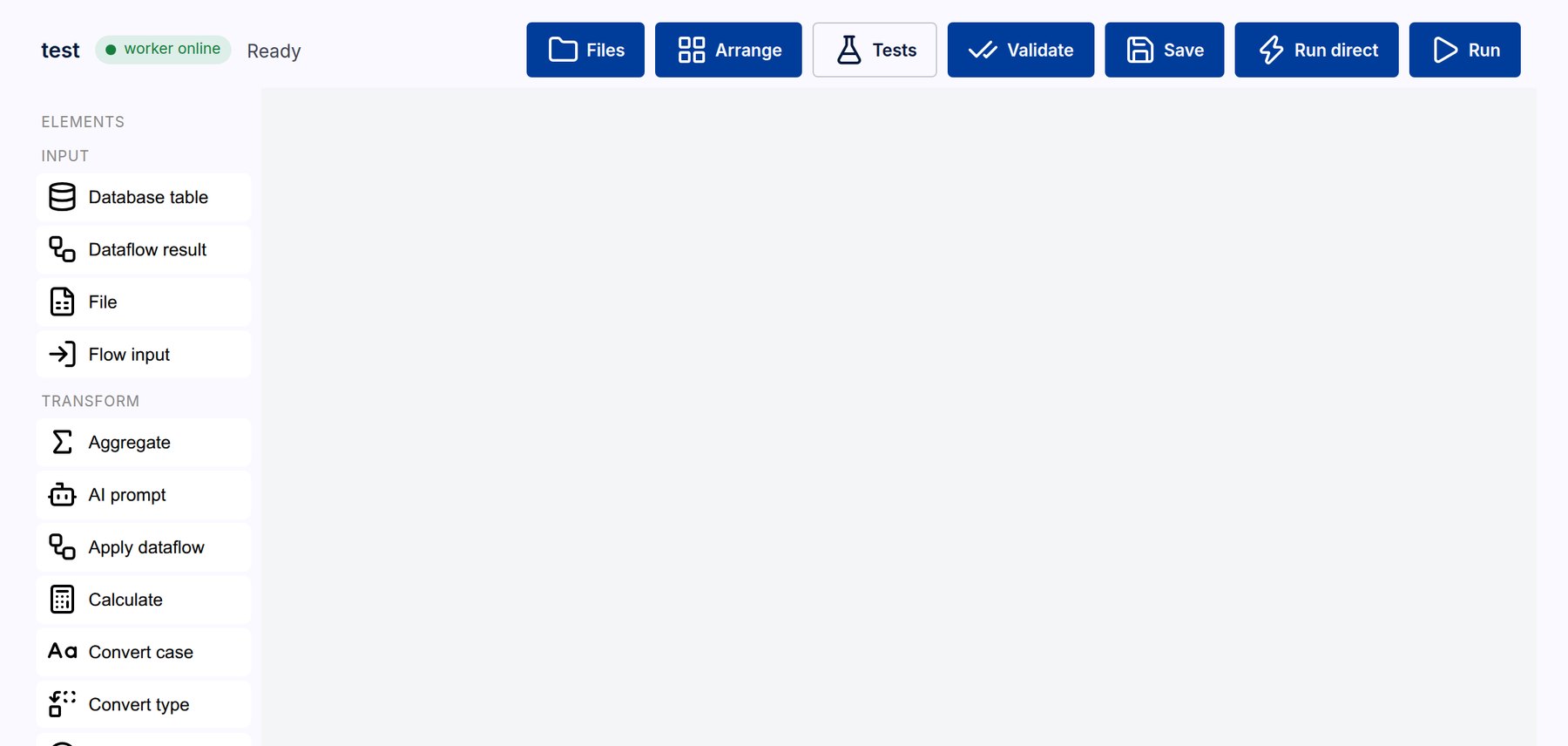
The dataflow editor: inputs, transformations and AI steps, maintained by the administrator.
App Factory roadmap3 / 8The roadmap
Seven steps, in this order
We publish the order of the steps, not dates. Each step is finished when it passes its own real-world test, described in plain words below.
A safe store for passwords and keys, smarter background queues, and one engine that writes incoming data by clear rules.
Scheduled syncs from ERP systems, APIs, MCP servers and files at a web address.
Describe a dataflow or automation in a sentence; templates; clear run history.
A home page for each role, or for a named user, built by your administrator.
Records on a map, distance and area filters, districts for all EU countries.
GDPR tools, retention rules, consent records and AI marking, generated from the definitions.
Reports, business documents, documentation, manuals and outgoing syncs.
Who can use App Factory, and when
App Factory roadmap4 / 8Steps 0, 1 and 2
Connect the systems you already have
Many companies run a legacy ERP that holds the data but is hard to change. App Factory will pull that data out on a schedule, so you can build flexible solutions on top, without touching the old system.
You choose how incoming data is written
Automation made easy
Write what you want in one sentence, and the AI drafts the dataflow or automation for your administrator to check and adjust.
Also in these steps
- Templates for common flows: import and clean a file, reminders on due dates, alerts on status changes
- Run history with the rows in and out of every step
- Separate queues for fast jobs, slow jobs, AI calls, email and syncs, with automatic retries
- Passwords and API keys stored encrypted, and never inside the definitions
App Factory roadmap5 / 8Steps 3 and 4
See your business at a glance, and on the map
Concept illustration with sample data.
Dashboards per role or per person
- Your administrator builds a dashboard for a role, such as sales or warehouse, or for one named user. It becomes their home page after login.
- Tiles show key figures, charts, lists, pivot tables and maps, made from the saved views and stored queries you already use.
- Every tile respects permissions: a sales person sees only the rows they may see, on the same dashboard as everyone else.
- Built and changed in the running application. No programmer, no new release.
Maps and location data
- Any list with an address or location can be shown on a map, and maps can be tiles on a dashboard.
- Filter by distance ("within 50 km of here") or by area, such as a municipality or region.
- Addresses are turned into map positions automatically in the background.
- Districts for all EU countries, Denmark first.
- Built on open standards: PostGIS in PostgreSQL, the open-source MapLibre map library, and map data from OpenStreetMap hosted on our own servers. No per-view map fees.
Concept illustration; the coastline is stylised.
App Factory roadmap6 / 8Steps 5 and 6
Compliance built in, and more ways out
Because every field is defined in the manifests, App Factory knows which data is personal. Compliance documents and tools can therefore be generated, instead of written and maintained by hand.
- GDPR record of processing, generated from the definitions
- Export or erase one person on request
- Retention rules per table, with legal holds for bookkeeping
- Consent records: which text, when, through which channel
- AI-made images, video and sound marked, as the EU AI Act requires
- Processor list, including the AI providers used
This step is the gate before partner consultants get access to App Factory.
New output
Excel, HTML and PDF, defined once and fed by a query definition or a stored query.
Quotes, orders, invoices and reminders as PDF, in the recipient's language.
A formatted PDF made directly from the manifests, always up to date.
An AI walks through the app with each role, takes screenshots and writes the manual.
Send data to other systems, using the same connections as incoming syncs.
Per role or per person, from step 3, as the everyday window on your data.
Light theme
Dark theme. Themes can be generated to match a brand.
App Factory roadmap7 / 8Shape the roadmap
Have a system that holds your data hostage?
The roadmap is built around real cases. If you run an ERP or another legacy system and want more flexible solutions on top of its data, or you need dashboards, maps or compliance tools for your business, we would like to hear from you.
Bring a case
Tell us about a system you would like to describe, connect or replace. Real cases decide which details come first.
Let us build it
Today the Wivvies team builds and runs App Factory projects for customers, from description to deployment.
Become a partner
Consultants who want to build with App Factory themselves can join once the compliance step and the manual are ready.
A short call about what you need.
Together we write the description in plain language.
App Factory generates the manifests for you to review.
Your application goes live, and your administrator takes over.
- Company
- Wivvies EEOD
- Address
- Varna City Park South, Vladislav Varnechic 267, Buhzur B, 8th Floor, Unit 35, 9009 Varna, Bulgaria
- Phone
- +359 876 44 1888
- +45 53 89 62 42
- michael@wivvies.com
- Web
- wivvies.com

 Scan to save contact
This brochure describes plans, not commitments. The order of the steps is decided; their content may change as we learn from real projects, and no dates are promised. Screenshots show the live App Factory with sample and reference data only. Illustrations of future features are concepts. SAP is a trademark of SAP SE; Microsoft and Dynamics 365 Business Central are trademarks of the Microsoft group of companies; they are named only as examples of systems data can be synced from. Map data in future versions: © OpenStreetMap contributors.
Tax number BG2066901548 / 8